
To do keyword research, start with the decision your reader needs to make, collect the words people use around that decision, inspect the search results and choose the page that can answer the need properly. Then prioritise a small set of topics using business relevance, available evidence and realistic competition. Search volume helps, but it should not decide the content plan on its own.
For Google and AI search, the useful output is a map of questions, evidence and pages. This guide combines a hands-on review of public Google results with a Search Console example published by Google. You can follow the same steps for your own website. It distinguishes an observed search query from a topic idea that still needs checking, so you can build a plan without inventing demand or buying a large tool subscription first.
How do I find the right keywords for my website?
Find the right keywords by combining what your business can genuinely help with, the language your audience uses and what the search results show they need. A phrase belongs on your shortlist when you can explain its reader, purpose and suitable destination page. This is the starting point for Nozentra's content and demand work.
Begin with one service or problem, rather than the whole website. Write down the reader's decision in a sentence, such as, “I need to plan the first few weeks of training my puppy.” From that sentence, identify a seed topic, in this case puppy training, and collect related language from enquiries, public discussions, existing pages and your own search data. Keep private customer information out of shared research tools.
Use this sequence for keyword research for SEO:
Define the audience and market. Name the buyer, the service and the countries where the page must be useful.
Collect candidate phrases. Record the source beside each one, separating an actual query from a brainstormed idea.
Search each promising phrase. Inspect the page types, questions, competing answers and geographic context.
Group by the decision. Keep phrases together when one good page can satisfy the same need.
Choose a page and priority. Improve an existing relevant page where possible, and commission a new one only when it serves a distinct purpose.
For international research, keep UK, US, UAE and Pakistan observations separate. A service term can bring up different providers, currencies or expectations in each market. Country settings in a tool help you investigate those differences, but they do not reproduce every local person's results. Record the date, language and requested location with your notes.
What is search intent and how do I match it?
Search intent is what someone is trying to accomplish with a search. Match it by giving them the appropriate kind of page and answer, rather than placing the phrase inside content that serves a different purpose. A person planning a puppy training routine needs an explanation; a person choosing a training class needs availability, location and enrolment details.
| Reader's purpose | Useful page format | What the page should help them do |
|---|---|---|
| Understand a concept | Explainer or how-to guide | Learn the subject or complete a task |
| Compare approaches or providers | Comparison or evaluation guide | Weigh options using clear criteria |
| Find a specific brand or page | Relevant brand or destination page | Reach the intended place |
| Buy or enquire | Product or service page | Understand the offer and take the next step |
Treat these as working categories. Real searches can have mixed intent. Look at several relevant results and read them: are they guides, service pages, tools, discussions or product listings? Note what they answer well and what remains unclear. An AI Overview alone is not enough evidence to decide the page format.
Also inspect People Also Ask, People Also Search For and any bottom related searches separately. Save the phrases you actually see. If Google only displays a bottom People Also Search For module, record that fact instead of inventing another list. Suggestions can identify useful questions, but they are not a measurement of monthly demand.
Nozentra's approach to connecting content to a real buyer decision adds a useful final test: what should the reader be able to understand, compare or approve after reading? If you cannot answer that, the topic needs more work.
What does keyword research look like in practice?
A useful keyword shortlist separates people looking for instructions from people looking for a provider. We worked through a public puppy-training example on 30 October 2026, checking actual Google results in English with UK, US, UAE and Pakistan country settings. Here is what we inspected, what changed our decisions and how you can repeat it.
What can you learn from a Search Console query table?
Use the table to identify wording that already appears in a property's search performance, then inspect the relevant pages and filters before deciding what to change. Google's published Search Console example below contains pet-related queries, including training topics and variations of a brand name. It is a historical product example from Google's 2021 announcement, so use it to understand the method rather than to judge current demand.
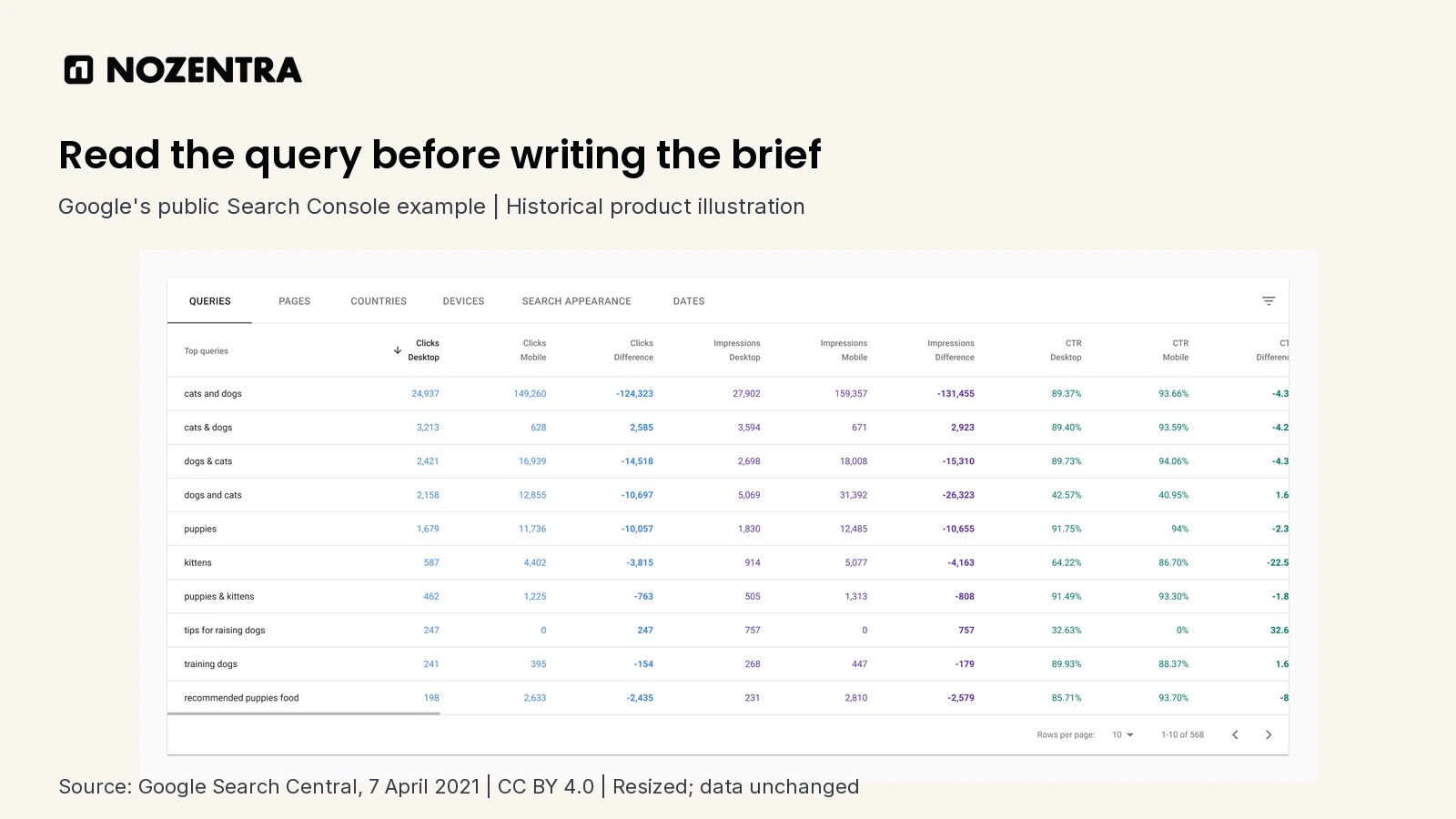
Source: Google Search Central, Improved data filtering and comparison on Performance reports, 7 April 2021. Reproduced under CC BY 4.0. The original image is resized within a branded frame; query text and figures are unchanged. These are Google's published example figures.
For your own analysis, open the Performance report, note the selected period and search type, and inspect the Queries tab. Select a relevant query and use Pages to check which URL receives visibility for it. Keep branded variations together when they represent the same destination. A training question may need an instructional page, while a brand-name variant may simply lead someone to the homepage. An impression count is evidence within the selected report, not the keyword's total monthly search volume.
What did we find when we checked the public search results?
The wording changed the type of answer Google surfaced. We began with puppy training schedule in the UK setting and opened the results rather than relying on their snippets. Petplan's training timeline organises its answer by age. Dogs Trust's puppy-training guide organises advice around skills and common starting questions. These are useful examples of informational pages answering a practical task in different ways.
We then searched puppy training classes with the US setting. The results included training providers and a local business module. Opening PetSmart's training page showed course options, store selection and availability controls. That changed the brief: someone searching for classes needs help finding and assessing an offer, so a general training article alone would leave the task unfinished.
| Search checked | Observation on 30 October 2026 | Editorial decision for a training website |
|---|---|---|
| puppy training schedule, UK | Timelines and training guides appeared | Consider an instructional guide with a usable schedule |
| puppy training classes, US | Providers and local business results appeared | Use a relevant course or service page where classes are actually offered |
| puppy training classes Dubai, UAE | Dubai providers, local results and a cost question appeared | Check real local coverage and course details before creating a location page |
| puppy training classes Karachi, Pakistan | Karachi trainers and local results appeared | Match the actual service area; do not copy another market's offer |
These are observations from the requested country settings, rather than a claim that every local searcher sees the same results. They also concern different phrases, so the table demonstrates a research workflow rather than measuring differences between countries.
How do actual search suggestions change the shortlist?
Suggestions help you refine the task, but you still need to judge whether they belong together. On the UK schedule search, the bottom People Also Search For module included “Puppy training schedule by age” and “Puppy training schedule week by week”. We would review both within one schedule brief before creating separate pages. No separate People Also Ask module or second bottom Related Searches list was exposed in that captured result.
The US classes search did display People Also Ask, including “At what age should you start puppy training classes?” Its bottom People Also Search For module included “Puppy training classes near me”. The first suggests an eligibility question for a course page; the second signals a need for useful location information. We inspected those modules separately and did not assign search volumes to the phrases.
The Karachi search also supplied an important rejection decision. Some bottom suggestions referred to police training, which did not fit our puppy-owner task. We left those out. A phrase appearing in a suggestion module is a reason to investigate it, not an instruction to publish an article about it.
Our resulting plan has two distinct purposes: help an owner plan a routine, and help an owner find a suitable class. For a website that genuinely offers training, the first could become a schedule guide and the second should map to the appropriate course page. Those are proposed content decisions from this public research exercise; no ranking gains or client campaign results are claimed.
What are long-tail keywords and why do they matter?
Long-tail keywords are less frequently searched queries, often with a more specific need. They matter because a precise question can be highly relevant to a business even when the potential audience is small. “Long-tail” does not simply mean a phrase with many words, and it does not guarantee easy rankings. Ahrefs' keyword research guide explains the relationship between specificity, demand and business value.
The schedule phrase in our public search exercise describes a need more clearly than the broad seed “puppy training”. That makes it useful for planning an answer, even though a suggestion module cannot tell us its monthly search volume. A longer phrase can still be competitive, and a short phrase can have low demand.
Group closely related questions when one page can answer them naturally. Create a separate page when the reader needs a meaningfully different answer or format. Publishing a separate article for every wording variation can leave several shallow pages where one well-maintained guide would help more.
Which free tools can I use for keyword research?
Start with Search Console for your own observed queries, Google Search for intent, Google Trends for relative interest and Keyword Planner for keyword ideas and estimates. Each answers a different question, so use them together and record what the data actually represents.
| Tool | Best use | Important limit |
|---|---|---|
| Google Search Console | See queries and pages already receiving visibility on your property | Requires property access; displayed queries are not a complete market dataset |
| Google Search | Inspect result formats, competing answers and actual question modules | Results vary with location, time and context; suggestions are not volume figures |
| Google Trends | Compare relative interest and seasonality | Normalised interest is not an exact count of searches |
| Google Keyword Planner | Expand ideas and inspect estimates for a chosen market | Google Ads account and access requirements apply; advertising competition is not organic SEO difficulty |
Google's Trends data FAQ explains its normalised data. Its Keyword Planner documentation describes the tool as support for Search campaigns. Read an advertising competition column as evidence about advertising, rather than a shortcut to deciding whether an article can rank organically.
Third-party free keyword research tools can extend a shortlist, but check their current limits and metric definitions. Keyword difficulty is a tool's estimate of organic ranking competition, not a Google score or a promise about your page. Compare it with the actual result quality, relevant competitors and the evidence you can contribute. Do not copy a numeric threshold from another business and assume it applies to yours.
How do I research topics for ChatGPT and AI search, not just Google?
Research the full question and its follow-up decisions, then test how well current answers serve that need. Keep observed customer questions, Google query data and sample AI prompts as separate kinds of evidence. An AI-generated list of phrases is a brainstorming aid, not proof that people search those exact phrases or that a topic has a particular monthly volume.
For the puppy-training example, an editorial test prompt could be: “I have a young puppy and need to plan a training routine. What should I learn at home, and what should I ask a training provider before joining a class?” Follow-up prompts might explore what a course covers, who teaches it and how to check its suitability. Label these as test prompts you created, not actual customer submissions.
Run a consistent set of tests, record the date and platform, and read the cited sources when citations appear. Ask what the answers leave out and what your business can explain with better evidence. OpenAI's ChatGPT Search guidance explains source links in search responses. A single test remains a sample of an answer, not a reliable measure of a brand's market-wide visibility.
For Google, current guidance on generative AI search describes query fan-out and continues to emphasise useful content and established SEO practices. It also points to a Generative AI performance report in Search Console. Follow the reports available in your property and their definitions; do not assume a standard query table measures ChatGPT or every AI search platform.

How do I turn the shortlist into a content plan?
Turn it into a plan by assigning each useful topic an existing or proposed page, a reader decision, supporting evidence, an owner and a review date. Keep unverified volume or difficulty fields blank. A short list with clear decisions is more usable than hundreds of phrases with no publishing purpose.
For each approved topic, write the answer the reader needs, the questions the page must cover, the evidence you can supply and the next relevant internal link. Check existing content before adding another URL. In our public exercise, the schedule and class searches belong to different briefs. Age-related schedule variations can be reviewed together, while unrelated police-training suggestions stay out of the plan.
After publication or revision, monitor relevant queries and page behaviour over a sensible period. Connect that evidence with useful outcomes such as qualified enquiries or readers reaching the relevant service page, while keeping attribution limits clear. If visibility is weak, check the wider SEO foundations, including indexing, intent, content quality and links, before assuming the keyword alone is the problem.